
How it works01Features02Pricing03Learn04Contact05Try Beck AI freeApp Store
Free 3-day trial · iCloud, Google, Outlook · No ads
Generic chatbots can suggest a plan; they can't see your day or write to it. These are the seven patterns that work once the AI has live read/write access to the calendar already on your iPhone — with two of them shown in motion below.
 iCloud
 Google
 Outlook
 Exchange
 Fastmail
 Yahoo
Yahoo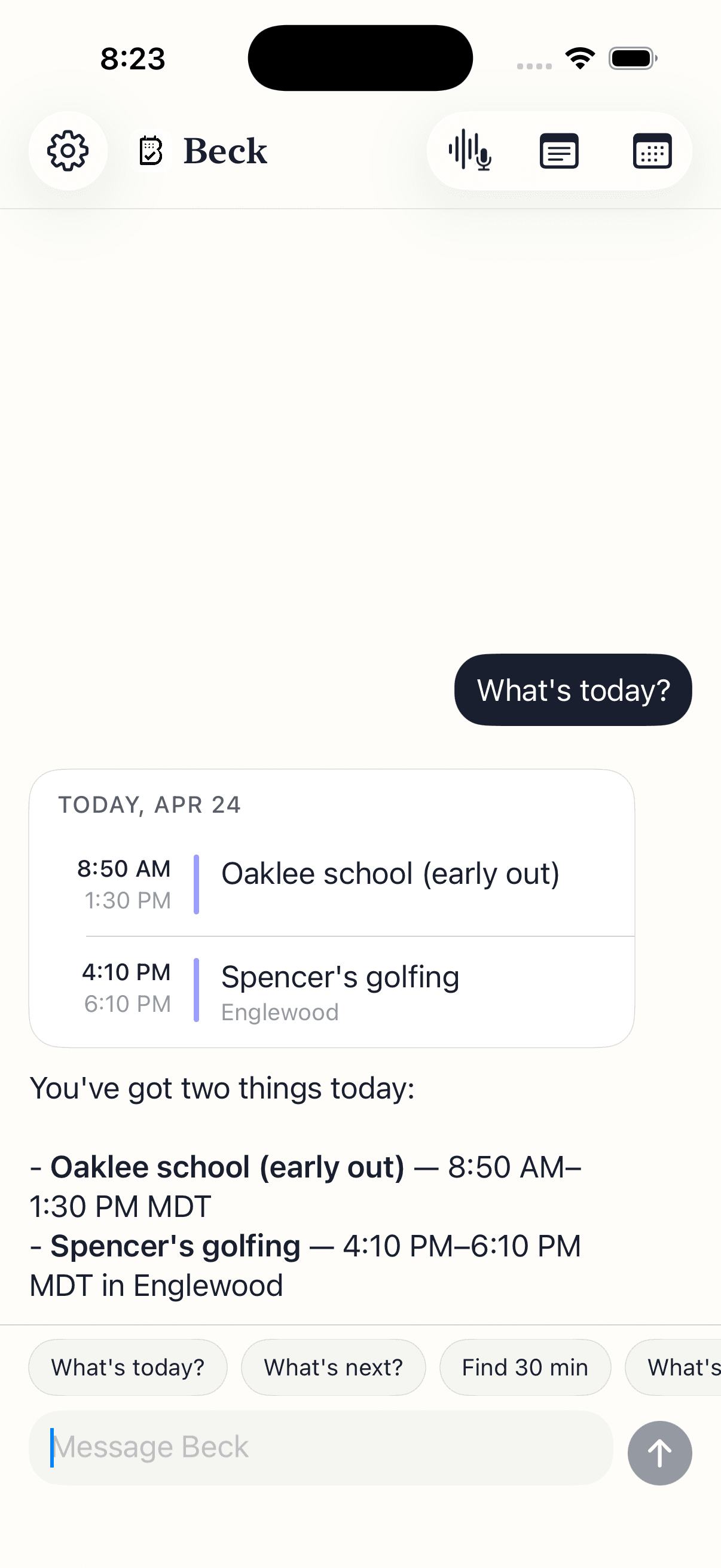
Each one is a different shape of question, but the contract is the same — say what you mean, read the draft, tap confirm.
Skip the day-by-day scroll. Ask the question and get a clean read — meetings, conflicts, the gap you actually have for lunch.
Don't open a date wheel. Say what you mean — the AI checks the calendar, finds the slot, and hands you a draft.
The school flyer on the fridge or the screenshot in your camera roll. One photo, every event extracted as drafts.
The thing iPhone Calendar makes you dig four screens for. Tell the AI what changed and it edits the series.
Sunday-night reset. Block real time around the meetings you already have — without opening a single form.
A one-paragraph read of the day, pulled from your real calendar. Like asking a chatbot to summarize — but it actually has the data.
Walking out of a meeting, in the pickup line, in the car. Tap the mic and say it — the same dictation iOS uses everywhere else.
One sentence in, one draft out — checked against your existing calendar before it asks you to confirm.
One photo, every date — not one at a time. Beck AI reads the image, pulls every event out, and lines them up as draft cards.
Both will happily talk to you about your time. Only one of them can act on it.
Your calendar is as private as your contacts. Nothing is sold, nothing trains AI, and nothing lands on your day until you tap confirm. That's the deal.
Every create, edit, and delete surfaces as a card. You see the draft before it touches your calendar.
Beck AI never trains on your calendar, your chats, or your notes.
Voice input is transcribed right on your phone. Only the current message travels so the AI can answer it — and it isn't retained after. Record a meeting and the audio is deleted the moment its transcript is ready.
An AI calendar is an app where chatting with the AI is the primary way you view, create, edit, and reason about your time — not a settings menu, not a sidebar feature, but the main interaction. The AI has live read/write access to the calendar already on your phone, so it can check conflicts, edit recurring events, and draft new ones from a sentence or a photo. Beck AI is built this way; most calendars treat AI as a bolt-on.
ChatGPT can suggest a plan; it can't see your day or write to it. The patterns on this page all depend on the AI having live access to your real calendar — drafting around your meetings, editing a recurring event, flagging conflicts. That requires an AI calendar, not a chatbot in a separate tab.
Both can create a one-off event if you phrase it cleanly. Neither holds a thread, neither reads your existing schedule for conflicts before writing, and neither edits a recurring series in one sentence. AI calendars do.
Yes. Beck AI reads and writes through your iPhone's Calendar — so iCloud, Google, Outlook, Exchange, Fastmail, and Yahoo all work. There's nothing to migrate; whatever your phone already shows is what Beck AI reads.
Not in Beck AI. Every create, edit, move, and delete shows up as a draft card first. Nothing touches your calendar until you tap confirm. If you're evaluating an AI calendar, this is the single most important thing to verify.
Beck AI is built on top of EventKit — Apple's calendar framework — which is what lets a single chat reach iCloud, Google, Outlook, Exchange, Fastmail, and Yahoo at once without a stack of third-party integrations. Android is on the roadmap, not the priority.
The next reschedule, school flyer, or “can we do Thursday?” takes one sentence.

 On your computer? Point your iPhone camera here.